Jira + quipteams
Turn a Jira card into a quipteams order without leaving Jira, and get the order’s progress posted back on the card. Everything here is built with Jira Automation rules - no code, no middleware.
POST /quotesBefore you start
- An API key. In quipteams open Admin → API → API Keys → Create key with the scopes
quotes:writeandkits:read. Pick Environment: Sandbox first - you get aqt_sandbox_key against an isolated copy of your workspace, so you can fire the rules as often as you like. Mint a live key once the rules work (step 4). - One base URL for both key kinds:
https://app.quipteams.com/api/v1. The key decides whether a request lands in the sandbox or in your real workspace. - Jira project admin rights, to add custom fields and automation rules.
Add the custom fields
In your Jira project go to Project settings → Issue types → Task and add these fields. Name them without spaces - the rules below reference them by name, as {{issue.fields.Kit_ID}}.
Employee RoleSelect list (single choice)One value per kit, e.g. Dev Creative FinanceCountryShort textISO code (AR) or full name (Argentina); the API normalises it.AddressShort textStreet address for the assignee.Kit_IDShort textFilled by the step 2 rules with the quipteams kit id. Never typed by hand.OrderIdShort textWritten back by the order rule. Stops the rule looping, and is how step 5 finds the card.StartDateDate (optional)The employee’s first day, sent as hire_date.PhoneShort text (optional)Courier contact, sent as phone_number.Office_IDShort text (optional)An office id from GET /offices, for cards that ship to an office instead of a home address.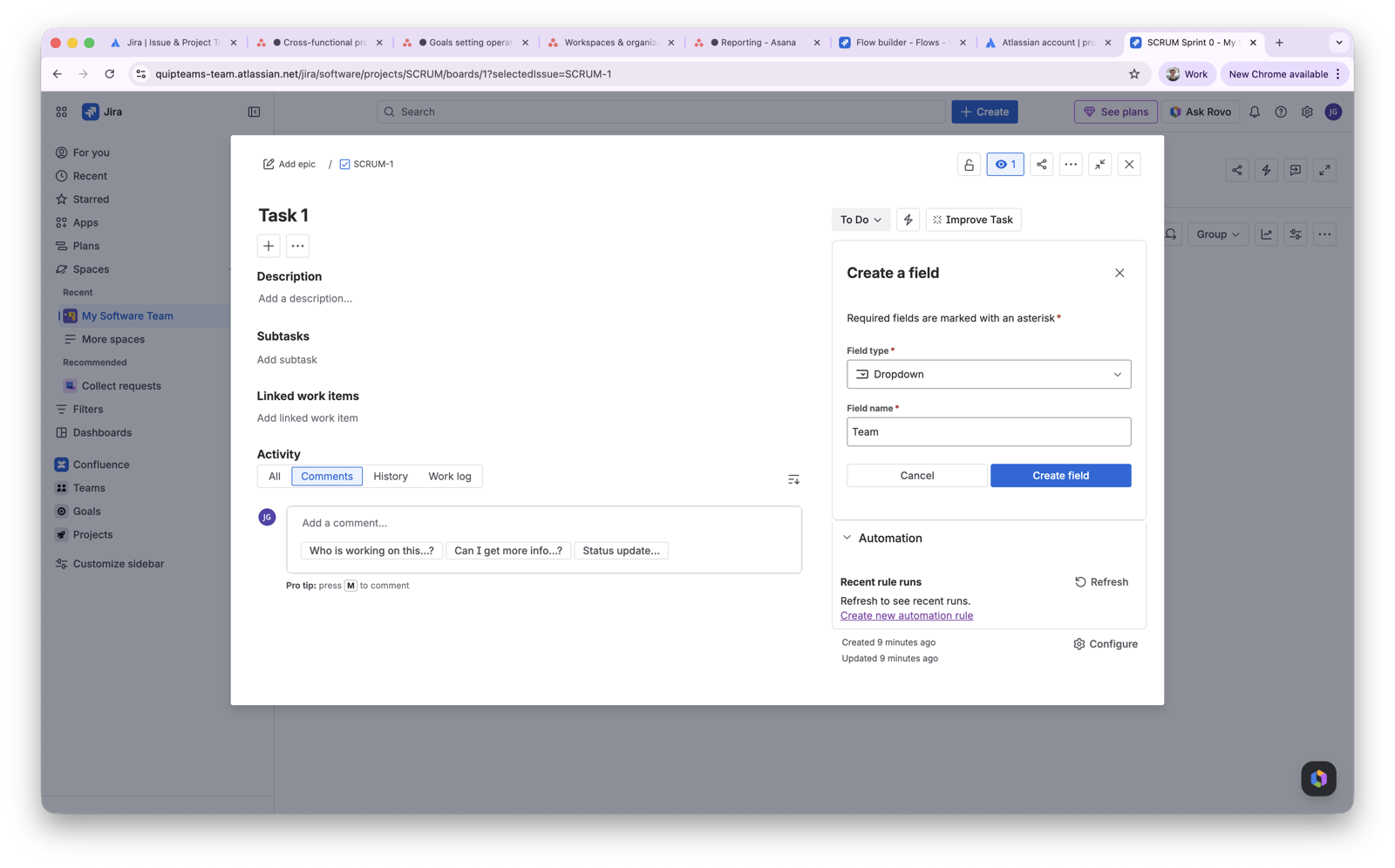
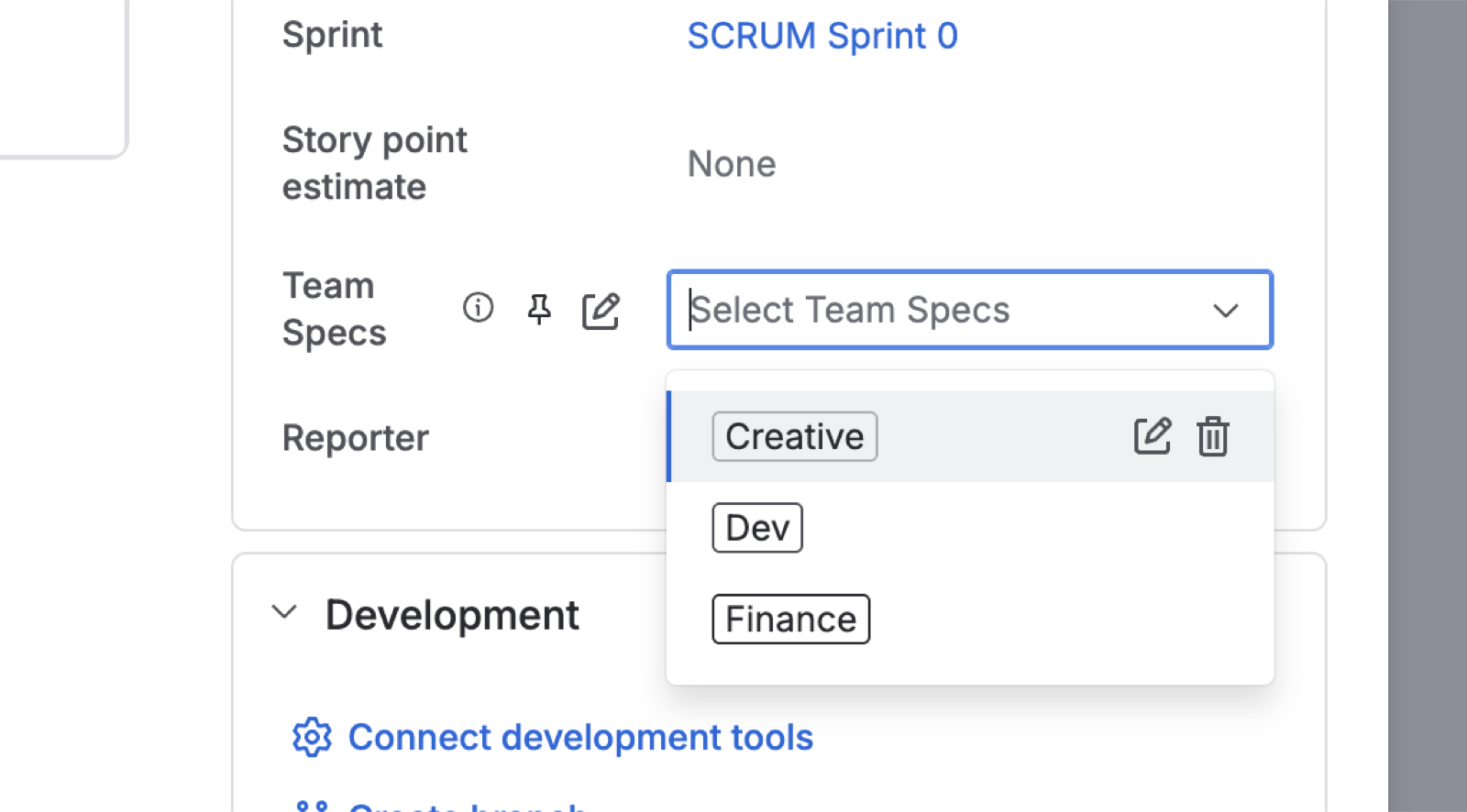
Map each Employee Role to a kit
Pull your kit catalogue with the sandbox key, or open Kits and press Try it:
curl https://app.quipteams.com/api/v1/kits \
  -H "Authorization: Bearer qt_sandbox_your_key"
Note the id of the kit each role should get. Then create one small rule per role that copies that id into Kit_ID:
- Trigger:
Field value changed→Employee Role - Condition:
Work item fields condition→Employee Roleis one ofDev - Action:
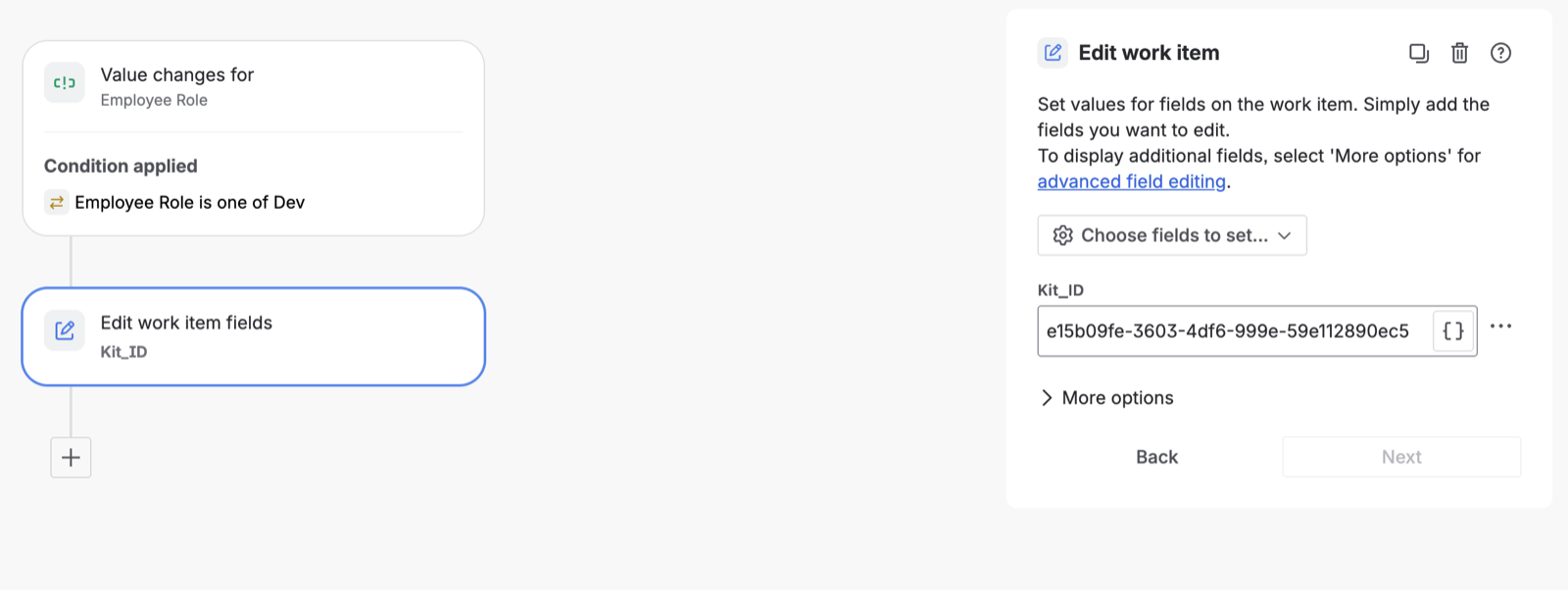
Edit work item→ setKit_IDto the kit id for Dev
{{#if}} helpers and ternaries do not reliably resolve inside HTTP bodies - the field arrives empty and the API rejects the request. One rule per role is boring and works. Sandbox and live kits have different ids: when you switch keys in step 4, pull /kits again and update these rules.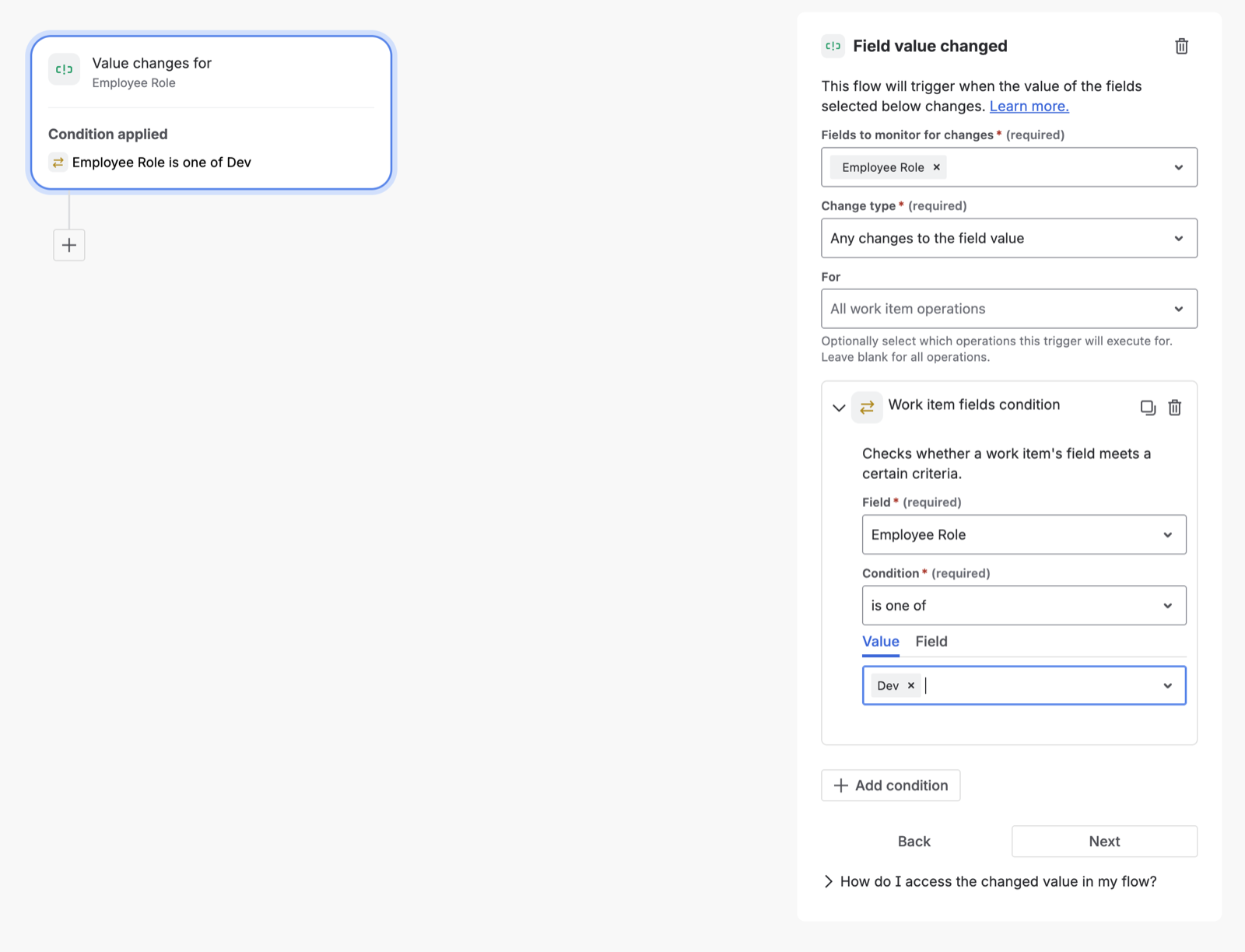
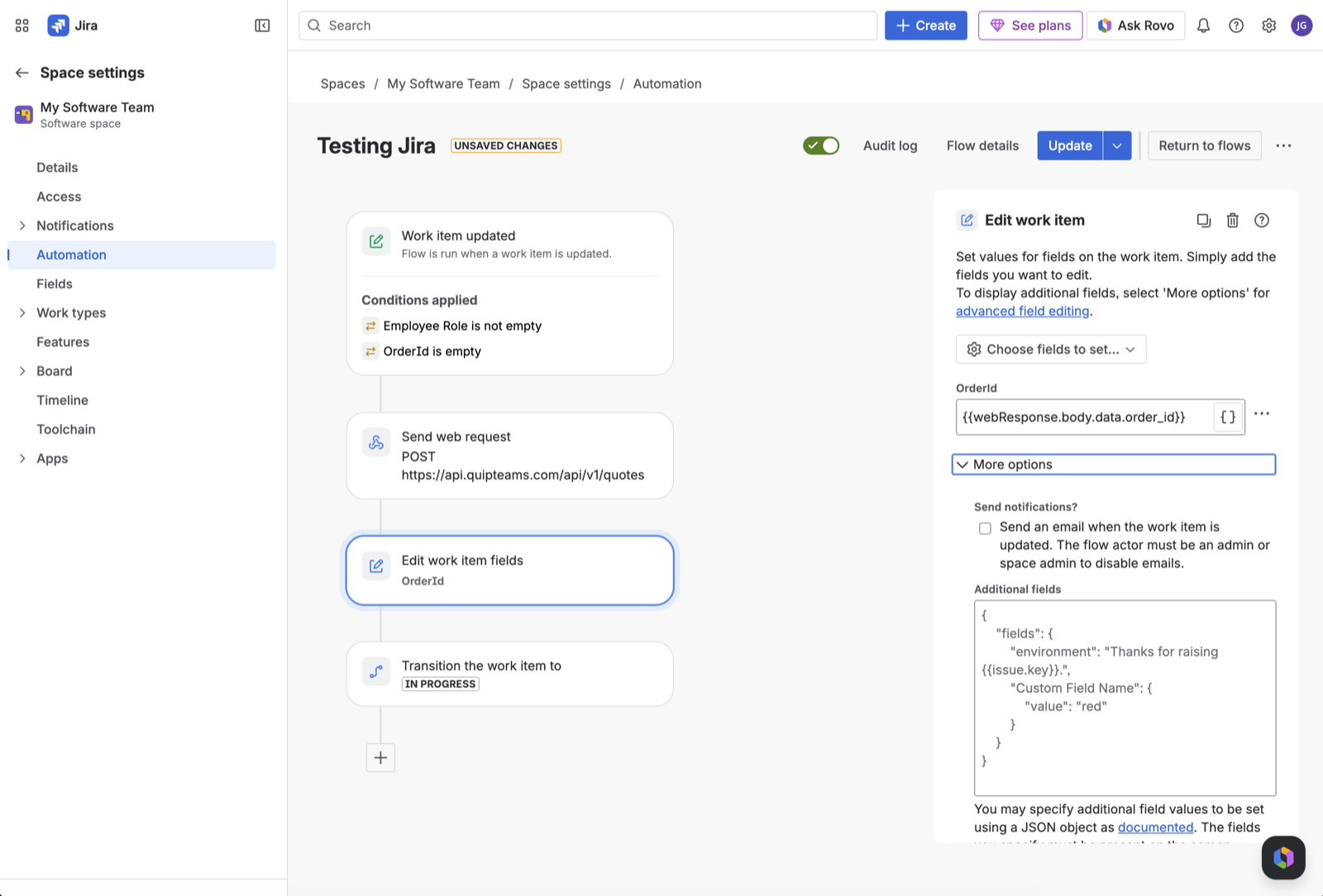
Create the order rule
Trigger
Work item updated- orWork item createdif the role is set on the create screen. Either way the conditions below decide when it fires.
Conditions (all three)
Employee Roleis not emptyKit_IDis not emptyOrderIdis empty - once Action 2 writes the order id back, the rule never fires again for that card.
kit_id and fails; the step 2 edit then re-triggers the rule and the second run succeeds, leaving a failed run in the audit log. With it, the rule fires exactly once, after Kit_ID lands.Send web request
https://app.quipteams.com/api/v1/quotesPOSTAuthorization: Bearer YOUR_API_KEYContent-Type: application/json{
"requester_email": "{{issue.reporter.emailAddress}}",
"requester_name": "{{issue.reporter.displayName}}",
"items": [
{
"kit_id": "{{issue.fields.Kit_ID}}",
"quantity": 1,
"comments": "Jira {{issue.key}}: {{issue.summary}}",
"recipients": [
{
"name": "{{issue.assignee.displayName}}",
"email": "{{issue.assignee.emailAddress}}",
"country": "{{issue.fields.Country}}",
"address": "{{issue.fields.Address}}"
}
]
}
]
}webResponse exists and saves an empty OrderId.Assignee is not empty to the conditions if cards are sometimes unassigned.Optional fields
Anything POST /quotes accepts can be filled from the card. A fuller body, using the optional fields from step 1:
{
  "requester_email": "{{issue.reporter.emailAddress}}",
  "requester_name": "{{issue.reporter.displayName}}",
  "po_number": "{{issue.fields.PO_Number}}",
  "notification_emails": ["it@yourcompany.com"],
  "items": [
    {
      "kit_id": "{{issue.fields.Kit_ID}}",
      "quantity": 1,
      "comments": "Jira {{issue.key}}: {{issue.summary}}",
      "recipients": [
        {
          "name": "{{issue.assignee.displayName}}",
          "email": "{{issue.assignee.emailAddress}}",
          "country": "{{issue.fields.Country}}",
          "address": "{{issue.fields.Address}}",
          "phone_number": "{{issue.fields.Phone}}",
          "hire_date": "{{issue.fields.StartDate.format("yyyy-MM-dd")}}"
        }
      ]
    }
  ]
}
To ship to an office instead of the assignee’s address, replace the recipient with an office_id (the office supplies country and address, so do not send those alongside it):
"recipients": [
  {
    "office_id": "{{issue.fields.Office_ID}}",
    "name": "{{issue.assignee.displayName}}",
    "email": "{{issue.assignee.emailAddress}}"
  }
]Edit work item → save OrderId
Add an Edit work item action and set OrderId to:
{{webResponse.body.data.order_id}}The API answers 202 with the full quote; data.order_id is the id you will see in quipteams (QT-…). Writing it on the card is what lets you reconcile later and what step 5 uses to find the card again.
Transition work item
Transition work item→ In Progress (or whatever column means “ordered” on your board).
Test in the sandbox, then go live
- Create a Task, assign it, set Country, Address and Employee Role. Within a few seconds
Kit_IDfills (step 2), thenOrderId(step 3) and the card moves column. - Confirm the order exists with the same sandbox key, or paste the id into the Get a quote Try it panel:
curl https://app.quipteams.com/api/v1/quotes/QT-1791992194461 \
-H "Authorization: Bearer qt_sandbox_your_key"- If anything failed, the rule’s Audit log shows the request and the API’s error message - see step 6.
- Going live: create a Production key with the same scopes, replace it in Action 1, pull
/kitsagain with the live key and update the ids in the step 2 rules. Live orders are priced by the quipteams team and emails go out to requesters and recipients.
Get the order's progress back on the card
quipteams can POST every change on the order to a URL you register. Jira Automation can be that URL: a rule with an Incoming webhook trigger finds the card by its OrderId and comments on it (or moves it).
In Jira: the receiving rule
- Create a rule with the trigger
Incoming webhook. Jira shows a Webhook URL and a Secret; keep both. - Under “Execute this automation rule with” choose Issues provided by running the following JQL search and enter:
OrderId ~ "{{webhookData.data.metadata.orderId}}"- Add the action
Add comment to work itemwith:
quipteams · {{webhookData.data.title}}
{{webhookData.data.message}}- Optional: an
If / elseblock on{{webhookData.type}}equalsquote.deliveredwithTransition work item→ Done. The event names you can match on are listed below.
The URL to give quipteams
Jira requires its secret on every call. quipteams sends fixed headers, so use Atlassian’s other option and append the secret to the URL as a final path segment:
https://api-private.atlassian.com/automation/webhooks/jira/a/<cloud-id>/<token>/<secret>In quipteams: register the endpoint
Admin → API → Webhooks → Add endpoint: paste the URL above and subscribe to quote.* and scheduling.*. The same by API, with a key that has webhooks:write:
{
  "url": "https://api-private.atlassian.com/automation/webhooks/jira/a/<cloud-id>/<token>/<secret>",
  "events": ["quote.*", "scheduling.*"],
  "description": "Jira status sync"
}What arrives
Each delivery is one JSON body; the JQL above reads data.metadata.orderId, the comment reads data.title and data.message. Details in Webhook signatures.
{
  "id": "0f6b1c2e-7d2a-4b9e-9a31-5c8e2f1d4a7b",
  "type": "quote.pending",
  "created_at": "2026-10-27T14:05:12.000Z",
  "data": {
    "event": "quote.pending",
    "company_id": "c3a1e9d2-0b4f-4e8a-9d7c-2f6b8a1e5c3d",
    "title": "Your quote is ready!",
    "message": "Quote #QT-1791992194461 has been priced and is ready to review.",
    "notifiable": { "type": "quote", "id": "8a2b1c3d-4e5f-6071-8293-a4b5c6d7e8f9" },
    "metadata": { "orderId": "QT-1791992194461", "status": "updated" },
    "occurred_at": "2026-10-27T14:05:11.000Z"
  }
}quote.submittedThe order rule ran; quipteams has the request.quote.pendingPriced. Someone reviews and accepts it in quipteams (or by API).quote.acceptedConfirmed and being prepared.scheduling.createdThe recipient was sent a link to choose a delivery slot.scheduling.submittedThe recipient picked a slot.quote.tracking_addedShipped; the message carries the tracking details.quote.deliveredDelivered.Troubleshooting
Every failed run is in the rule’s Audit log in Jira, with the API’s response body. The messages you are most likely to see:
items[0].kit_id () not found in this companyKit_ID was empty when the rule fired, or it holds a sandbox id while the key is live.Add the Kit_ID is not empty condition (step 3). After switching keys, pull /kits again and update the step 2 rules.items[0].recipients[0].country is requiredThe Country or Address field is empty on the card.Make both fields required on the create screen, or add "is not empty" conditions.items[0].recipients[0].email is required and must be a valid emailThe card is unassigned, or the assignee has no email in Jira.Assign the card before the role is set, or add Assignee is not empty to the conditions.401 UNAUTHORIZEDWrong, expired or revoked key.Create a new key in Admin → API and paste it into the Authorization header.403 Missing required scope: quotes:writeThe key was created without the scope.Keys cannot be edited: create one with quotes:write and kits:read.429 RATE_LIMITEDMore than 20 order creations in a minute (a bulk import, usually).Space the cards out, or import in batches of 20 per minute.